
e-School Management: one platform from enquiry to alumni
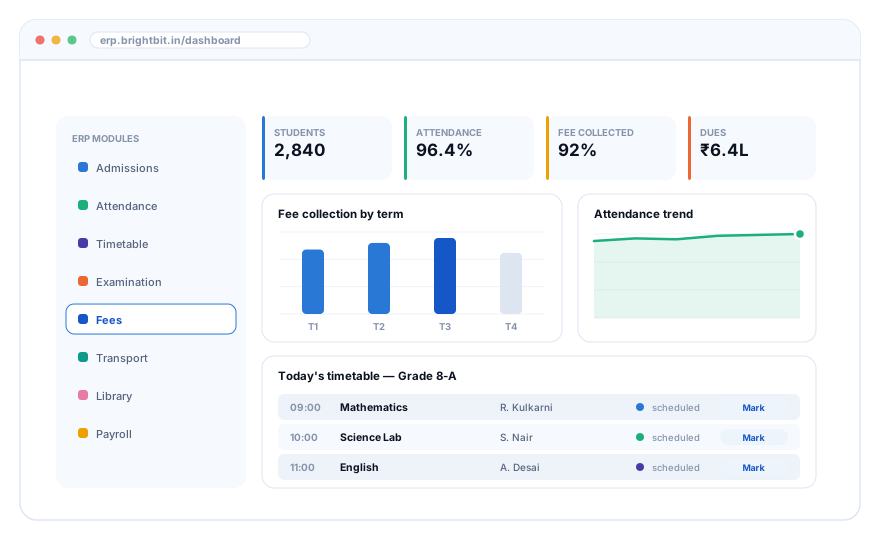
A 2,840-student CBSE campus across three buildings was running on eleven Excel workbooks, two registers and a WhatsApp group per class. Fourteen months later it runs on one platform with a parent app, and the front office no longer writes receipts by hand.
- 14 modules
- Angular
- .NET 8
- SQL Server
- Flutter app
- Azure
The situation before we arrived
The school was not disorganised — it was over-organised in eleven separate places. Each co-ordinator had built a workbook that worked for them, and reconciling those workbooks had become somebody's actual job.
- Fee dues were known accurately only after a two-day manual reconciliation, so follow-up always ran a fortnight late.
- Attendance was collected on paper at lunch, keyed in the next morning, and so was useless for same-day parent alerts.
- Three staff spent the first week of every term writing receipts and matching bank credits by hand.
- Examination marks travelled by WhatsApp photo, were retyped, and every term produced a handful of transcription disputes.
- Nobody could answer "how many transport seats are actually free on route 7" without a phone call.
What the school asked for first was a fee-collection tool. What the discovery workshop showed was that fees were only unreliable because admissions, attendance and transport data were unreliable upstream. We proposed the wider platform, phased, and said so in writing before quoting.
The fourteen modules
Delivered in four phases. Each module is usable on its own — the school was live on admissions and fees before examinations existed.
1. Admissions & enquiry
Web and walk-in enquiry capture, counsellor allocation, follow-up reminders, document checklist, seat allotment and a conversion funnel.
2. Student information
One record per student: family, medical notes, documents, sibling links, house and section history, and a complete change log.
3. Attendance
Period-wise capture on a teacher's phone, offline-tolerant, with an automatic absence alert to parents at 09:45.
4. Timetable
Constraint-aware generator (teacher load, lab availability, games periods) plus a substitution board for the day's absences.
5. Examination & results
Assessment schemes, mark entry with validation, moderation trail, CBSE-format report cards and result publication to the parent app.
6. Fees & collections
Fee heads, concessions, instalment plans, UPI and card collection, auto receipting, bank reconciliation and a dues ageing report.
7. Transport
Routes, stops, seat allocation, driver and vehicle records, live boarding confirmation and a parent notification when the bus reaches school.
8. Library
Catalogue, barcode issue and return, overdue reminders and per-class reading statistics.
9. Hostel & inventory
Room allocation, mess attendance, uniform and book-store stock with re-order alerts.
10. HR & payroll
Staff records, biometric-linked attendance, leave workflow, salary structures, statutory deductions and payslip publishing.
11. Accounts & budget
Fee income posting, expense vouchers with approval, department budgets and a Tally-compatible export.
12. Communication
Circulars, targeted SMS and app notifications by class, section or route, with delivery reporting.
13. Parent & student app
Attendance, homework, results, fee payment, bus status, leave requests and a direct message thread to the class teacher.
14. Reports & MIS
Board-level dashboards, statutory returns, custom report builder and scheduled email delivery.
Three roles, three different apps
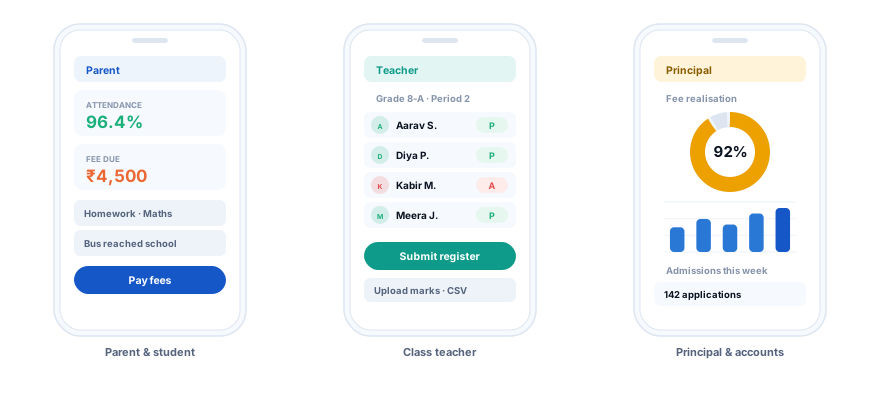
The same codebase, but a parent, a teacher and a principal each open to a different first screen — because they each need exactly one thing quickly.
Architecture & decisions
A deliberately unfashionable architecture: one well-factored application, one database, background workers for the slow things. A school of this size does not need microservices, and would not have anyone to operate them.
- Front end
- Angular with a shared component library; the same design system drives the admin console and the public admission form
- API
- .NET 8 REST API, role-based authorisation, row-level scoping by branch, audit row on every write
- Database
- SQL Server; academic-year partitioned, with a read replica for reporting so month-end queries never slow the front office
- Mobile
- Flutter, offline queue with conflict resolution, biometric unlock, FCM push
- Jobs
- Nightly dues ageing, absence alerts, report-card generation, bank reconciliation import
- Integrations
- Payment gateway with UPI, SMS provider, WhatsApp Business templates, biometric attendance devices, Tally export
- Hosting
- Azure App Service with staged deployment slots; nightly backups with a monthly restore drill
- Access control
- Nine roles from receptionist to trustee; a class teacher can see only their own sections
The decision that mattered most: fees post to accounts automatically, but only after a receipt exists. That one rule removed the entire reconcile-later habit and is why the fee numbers became trustworthy in the first term.
How we rolled it out
Phased against the academic calendar, not against our convenience. Nothing went live in the two weeks before an examination.
16-week phase-one rollout
Hover a bar for what happened in that window
What measurably changed
The school's own numbers, taken from the system and from their pre-project baseline.
Fee realisation by term
Percentage of billed fees collected by term end
How parents pay now
Share of fee transactions by mode
Weekly staff hours returned
Hours per week, by function
Where the platform sits today
Eighteen months after go-live, still on the original architecture.
What we would do differently
We underestimated data clean-up by three weeks
2,840 student records held duplicates, siblings entered as unrelated, and four spellings of the same locality. We budgeted two weeks and needed five. On later rollouts, clean-up starts in week one and runs in parallel with build, and we quote it as a separate line item so it cannot be quietly compressed.
The timetable generator was over-built
We built a constraint solver. The school's academic co-ordinator had thirty years of judgement and wanted to place the difficult periods herself. What she actually needed was a fast manual board with clash detection and a substitution view. We now build the board first and the generator only if it is asked for again.
Training twice was not optional
The first training round happened before staff had live data of their own, so half of it did not stick. The second round, two weeks after go-live and using their real classes, is the one that worked. Two rounds is now standard in our estimates.
We should have shipped the parent app later, not earlier
Parents saw attendance before teachers had settled into daily capture, which generated avoidable queries in week one. The rule we follow now: a parent-facing screen goes live only after the staff-facing screen behind it has run cleanly for a fortnight.
Children's data, handled carefully
- Role-scoped access: a class teacher sees their own sections, not the school.
- Every read of a student record is logged; every write keeps the previous value.
- Photographs and documents in private storage with expiring signed links, never public URLs.
- Parent app messaging is between a parent and the class teacher only, and is retained per school policy.
- Nightly encrypted backups, with a restore actually performed and signed off monthly.
- Personal data is masked in every non-production environment.
See it with your own data
Send us one term's fee sheet and one class list. We will load them into a sandbox and show you your own school on the platform.